
Ableton Live II: MIDI (Musical Instrument Digital Interface)
Tighten MIDI timing and build grooves in Ableton Live
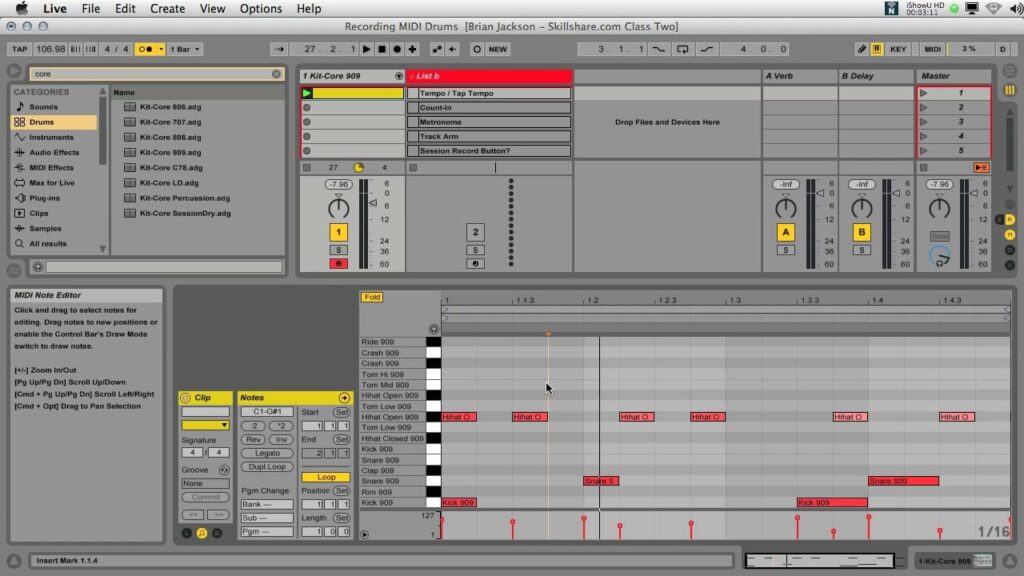
Ableton Live II: MIDI (Musical Instrument Digital Interface) walks producers and musicians through practical MIDI workflows inside Ableton Live, covering setup of MIDI keyboards, assignment of KEY and MIDI mappings, and techniques for drawing and editing drum beats. It emphasizes hands-on tools such as Session View recording, quantize, and groove application so you can quickly produce tighter, performance-ready MIDI parts.
Taught by an Ableton Certified Trainer, the class balances technical instruction with creative practice to help learners build usable musical sketches and understand timing-correction workflows. It is well suited to producers, beatmakers, and sound designers who want concrete skills for arranging, recording, and polishing MIDI-based ideas.
At a Glance
Ableton Live II: MIDI (Musical Instrument Digital Interface) is a focused online class that introduces practical MIDI workflows in Ableton Live, covering clip creation, drum programming, recording with external or built-in keyboards, and timing tools such as quantize and grooves.
The class is taught by Brian Jackson, an Ableton Certified Trainer and audio engineer, and is aimed at producers, musicians, sound designers, and audio enthusiasts seeking hands-on instruction.
| Level | Beginner |
| Rating | 4.6 out of 5 |
| Duration | 60+ minutes |
| Languages | English |
| Certificate | No certificate |
| Access | Access while your Skillshare subscription is active |
| Course includes |
|
| Price | Subscription-based (monthly or annual plans) |
What This Course Teaches
This class frames outcomes as practical MIDI production competencies you can use immediately in Ableton Live, from setting up hardware and mapping controls to creating tight rhythmic parts and polished musical sketches.
Learners will leave with measurable skills for drawing and editing MIDI, recording parts in Session View, and applying quantize and groove tools to improve timing.
How the Course Is Structured
The course is organized into 5 modules and runs about 68 minutes in total.
It progresses from basic MIDI hardware setup and control mapping through beat creation, multitrack recording in Session View, and timing tools such as quantize and grooves.
Curriculum overview
01 MIDI in Live 101 ▾
Explains how to connect and configure a MIDI keyboard, set preferences in Live, and enable KEY and MIDI mapping for control assignment.
02 Drawing Drum Beats ▾
Demonstrates creating clips, using Draw Mode to place hits, and switching grid options (including Adaptive Grid) to refine drum patterns.
03 Recording MIDI in Session View ▾
Covers recording drum takes, bass lines, and keyboard parts in Session View using a metronome and existing clips as timing references.
04 Quantize & Groove ▾
Shows how to use Quantize Settings to snap notes to a grid, manually adjust timing, and apply groove templates (e.g., swing) from Live’s Packs.
05 Hands-on Class Project ▾
Guides learners to create a quantized musical sketch by recording, editing, and organizing multiple MIDI clips into a timed sequence.
Audience & Requirements
The course targets producers, electronic musicians, sound designers, and creative hobbyists who want practical, hands-on training for working with MIDI inside Ableton Live.
It is presented for learners with little formal MIDI knowledge who want to set up controllers, program beats, and improve timing in their own sketches.
- Electronic and beat producers building MIDI-based musical sketches.
- Musicians who want to record and tighten MIDI parts in Session View.
- Sound designers and beatmakers learning control mapping and groove application.
- Creative hobbyists new to MIDI and Ableton searching for practical workflows.
- Ableton Live installed (the class demonstrates Live 9; a compatible Live version is required).
- A MIDI keyboard or controller is recommended (Live’s built-in keyboard can be used as an alternative).
- No special musical prerequisites—basic comfort with running audio software is sufficient.
Final Verdict
Ableton Live II: MIDI is a practical, tightly focused course that delivers clear, usable MIDI workflows and timing techniques and is a strong value for learners already on the platform.
It is recommended for producers, electronic musicians, and creative hobbyists who want hands-on skill improvement rather than a credential; however, learners seeking a verified certificate or a one-time-purchase course should consider that this class is accessed via a subscription and does not issue a certificate.

 LinkedIn Learning