
Ableton Live I: The First Steps Of Digital Music Production
Get comfortable navigating Ableton Live and warping audio.
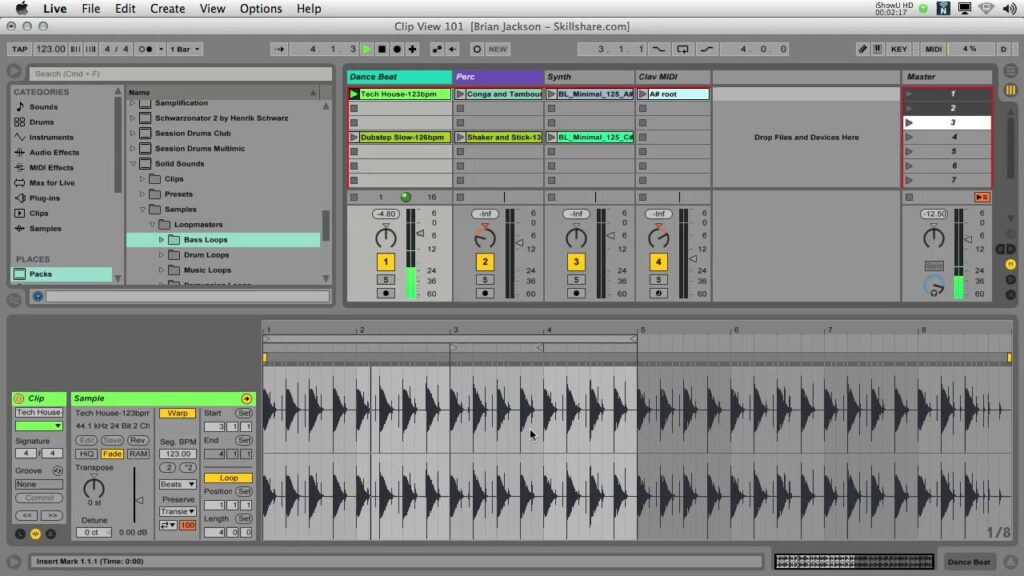
Ableton Live I: The First Steps Of Digital Music Production is an introductory, hands-on class taught by Ableton Certified Trainer Brian Jackson that orients learners to Live’s interface and core workflow.
The course emphasizes practical skills like organizing clips, managing tracks and scenes, using the browser to source sounds, and applying warping to align audio, making it a direct way for beginner producers, remixers, and musicians to gain immediate, usable music production skills in Ableton Live.
At a Glance
Ableton Live I: The First Steps Of Digital Music Production is an introductory Skillshare course taught by audio engineer and Ableton Certified Trainer Brian Jackson.
The class orients learners to Ableton Live’s interface, clips/tracks/scenes workflow, and basic warping techniques, ending with a hands-on project to practice tempo matching and audio synchronization.
| Level | Beginner |
| Rating | 4.6 out of 5 |
| Duration | 60+ minutes |
| Languages | English |
| Certificate | Not offered |
| Access | Included with Skillshare subscription; access while your subscription is active |
| Course includes |
|
| Price | Included with subscription (Skillshare Premium) |
What This Course Teaches
Complete this course to gain practical, measurable skills in navigating Ableton Live, organizing clips and scenes, using the browser to add sounds, and applying warping to align audio.
How the Course Is Structured
The course is organized into six short modules that move from setup and interface orientation through core workflow elements to warping techniques and final project-sharing steps.
The entire class runs approximately 60+ minutes in total and is presented as a sequence of concise, focused sections rather than long, standalone lectures.
Curriculum overview
01 Hands-on Class Project ▾
Capstone task to synchronize three audio clips using warping so they play at the same tempo.
- Project: Synchronize 3 audio clips with warping
02 Introduction and Welcome ▾
Guides installation and preference setup, tours Live’s built-in tutorials, and shows how to create and save a new Live Set.
03 Clips: Live’s Basic Building Block ▾
Explains organizing clips on tracks and scenes, creating variations with the clip view, and using quantization and launch controls.
04 Live’s Browsers ▾
Demonstrates searching for sounds and files, previewing loops, and adding audio or instrument racks from the browser into a session.
05 Warping Audio 101 ▾
Covers enabling Warp, selecting appropriate warp modes, and placing or editing warp markers to align audio to project tempo.
- Practice: Warp 3 songs so they match beats
06 Sharing your projects ▾
Explains using Collect All and Save, packaging a project into an .alp file, naming and uploading the pack, and sharing a download link; suggests optional Creative Commons licensing.
Audience & Requirements
This course targets beginners and creative practitioners who want a practical, hands-on introduction to Ableton Live’s workflow and core tools.
- Beginner producers learning the basics of music production in Ableton Live.
- Musicians who want to arrange clips, scenes, and basic sessions in Live.
- DJs or remixers who need to learn warping and tempo-matching techniques.
- Sound designers and hobbyists exploring sample management and session-flow.
- Ableton Live installed (trial version is sufficient for following along).
- Solid computer fundamentals, including navigating files/folders and adjusting basic OS settings.
- Headphones or studio monitors for listening and warping accuracy (recommended).
- No prior music-production experience required; familiarity with basic musical concepts is helpful.
Final Verdict
This course is a practical, low-commitment way for beginners to get comfortable with Ableton Live’s core workflow.
Given its concise structure, hands-on warping project, and a strong user rating, it’s well suited to hobbyists, novice producers, and performers who want usable production skills quickly; because it’s offered through a subscription and does not award a formal certificate, it’s less appropriate for learners who need accredited credentials or deep, advanced training.

 LinkedIn Learning